


IPTV for Sports: What Matters for Live Games and How to Test It
IPTV for sports works well when four things hold up during a live game: the picture stays smooth at peak hour, it shows 50 or 60 pictures per second, the delay behind live stays steady, and the guide shows the game where you expect it. Channel counts matter less than those four. The only real proof is a test during an actual game, and a 24-hour free trial is enough for that.
We run IPTV Canada (iptvv.ca), and game nights are when our servers work hardest, so this is the checklist we would use if we were buying. You will see why your neighbour cheers before you do, what frame rate does to a puck or a ball, what an uptime percentage allows, how many screens a game night needs, and a trial test you can run in one evening.
What Makes IPTV for Sports Different From Other TV?
Sports are live, fast and watched by everyone at the same moment, so they test a service harder than anything else. A movie can buffer ahead and hide a slow second; a live game cannot.
First, there is no cushion: the stream has to keep up with the play in real time. Second, the motion is fast, so a weak frame rate or a low bitrate shows up as a blurry puck or a smeared ball. Third, the audience arrives all at once. When a big game starts, a large share of viewers open the same channel within a few minutes.
That is why a service that looks perfect on a quiet Tuesday afternoon can still struggle on a Saturday night. So judge IPTV for sports on game conditions, not on a demo.
Why Does IPTV Run Behind Cable, and How Much Delay Is Normal?
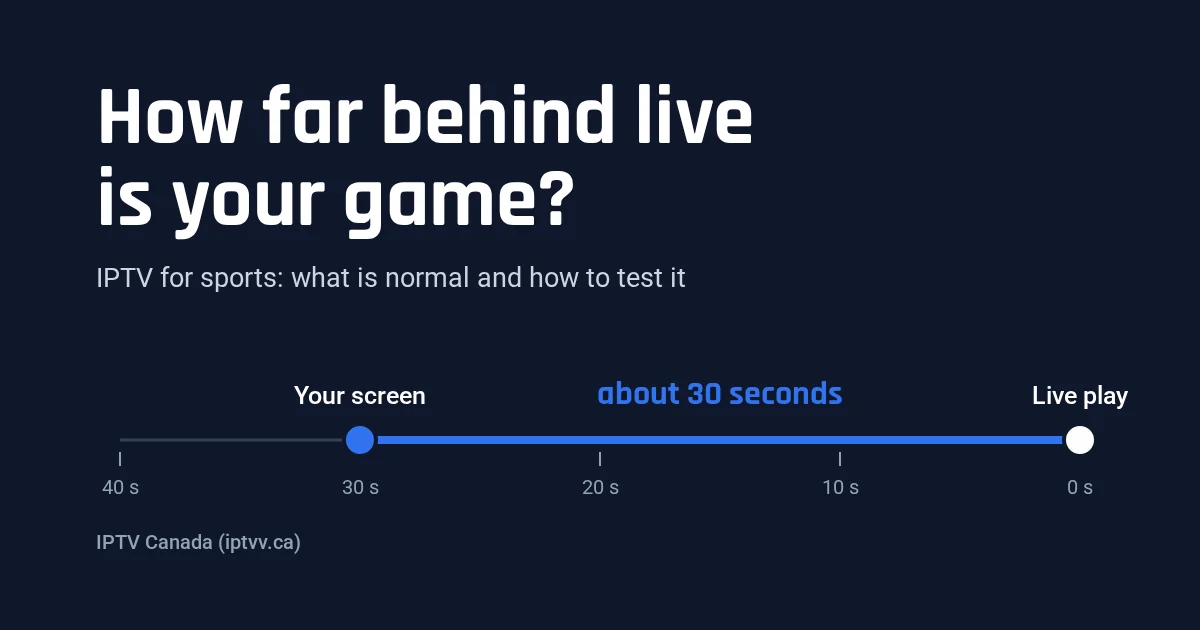
Internet video travels in short chunks, and a player waits for a few chunks before it starts, so a live stream usually runs 10 to 40 seconds behind the fastest broadcast. That delay is normal as long as it stays the same through the game.
The numbers come from the HTTP Live Streaming standard, IETF RFC 8216. It tells a player not to start closer than three chunk lengths from the live edge, and it calls 10 seconds a typical chunk length. Three chunks of 10 seconds is about 30 seconds before you even count encoding. Shorter chunks cut the gap, but they also leave the player less room to absorb a slow second.
| How the game reaches you | Typical delay behind the live play |
|---|---|
| Over-the-air antenna | A few seconds, usually the fastest |
| Cable or satellite box | A few seconds more than an antenna |
| IPTV and streaming apps | About 10 to 40 seconds, depending on chunk length and player buffer |
| Score alerts on your phone | Often ahead of every TV picture |
Steady delay vs growing delay
A steady delay is harmless: you see every play, just a little later. A delay that grows through the game means the player keeps pausing to refill its buffer. In that case, restart the channel to jump back to live, then see our guide to fixing IPTV buffering.
As for spoilers, mute score alerts on your phone during the game. Your neighbour on cable will still cheer first, but you will not know why.
Does Frame Rate Matter for Sports on IPTV?
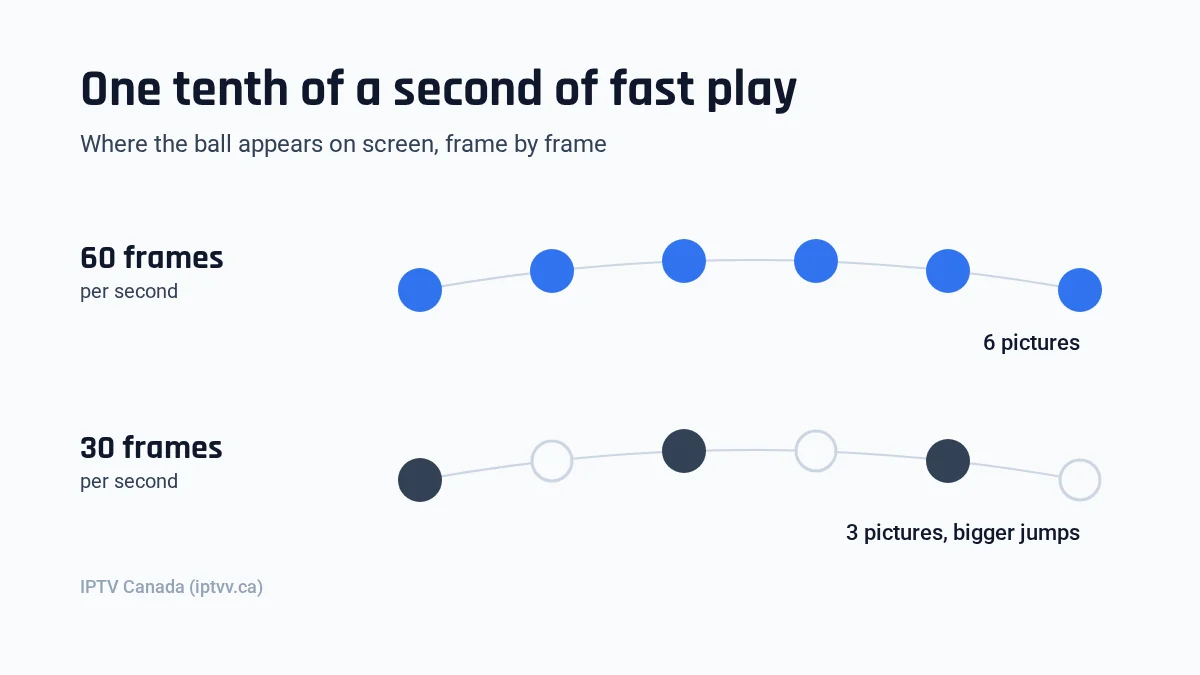
Yes. Frame rate decides how smooth fast play looks, and North American sports are made to be watched at about 60 images per second. A feed cut down to 30 full frames shows half the positions, so a fast puck or ball jumps instead of gliding.
The North American digital TV standard, ATSC A/53 (Part 4), allows 23.976, 24, 29.97, 30, 59.94 and 60 frames per second. Its 720-line HD format runs up to 60 full frames. Its 1080-line format tops out at 30 frames. Broadcasters usually send it interlaced, as 60 half-pictures (fields) a second, which keeps motion smooth. Channels from Europe and many other regions use 50, which looks just as smooth. The problem is a sports feed converted to 25 or 30 full frames to save bandwidth. That throws away half the motion. On a talk show you would never notice, but on a breakaway or a fast bowler you will.
How to check the frame rate yourself
Many player apps show the resolution and frame rate in a stream info or media info panel, often under the options button while a channel plays. Open a live game and look for 50 or 60. A reading of 25 or 30 is not always bad news. An interlaced channel (1080i) often shows up that way while still carrying 50 or 60 fields a second. So watch a fast play too. If the panel shows 25 or 30 progressive and the puck jumps, that feed stays choppy at any internet speed.
What Happens to IPTV Sports Streams at Peak Hour?
Peak hour is when the most people watch at once, usually evenings and the start of the biggest games. A service has to carry that load without freezing, and an uptime percentage alone does not tell you whether it can.
Two networks get busy at the same time. Our servers see their heaviest load when a big game starts, and your internet provider’s local network is also at its busiest in the evening. So a test at 2 pm proves very little. We plan capacity around those evenings, and we still tell people to test at peak instead of taking our word for it.
What an uptime claim really allows
Uptime counts the time a server answers, not the time every stream plays smoothly under load. Here is what common claims permit:
| Uptime claim | Downtime allowed in a 30-day month | Downtime allowed in a year |
|---|---|---|
| 99% | 7.2 hours | 87.6 hours |
| 99.5% | 3.6 hours | 43.8 hours |
| 99.9% | 43 minutes | 8.8 hours |
| 99.99% | 4.3 minutes | 53 minutes |
In other words, a 40-minute outage during the third period still fits inside 99.9% for the month. So the better question is what happens on the busiest night of the year, and only a test during a real game answers it.
How Do You Find Games in the IPTV Guide?
Use the TV guide (the EPG) and a favourites list. With 25,000+ live channels, the guide is what turns a huge list into “the game is on this channel at 7:30”.
First, search the channel list by sport, by region or by the team you follow, then add those channels to favourites. Next, open the guide and check that tonight’s game appears with the right start time. Sports channels often come in regional versions, so the same game can sit on more than one channel.
A guide that shows times one hour off is usually a time zone setting in the player, not a broken channel. Our IPTV EPG guide explains how to fix a wrong one.
How Many Screens Do You Need for Game Nights?
Count the streams that play at the same time, not the people in the room. One TV with ten friends in front of it is one screen; the main TV plus a phone showing a second game is two.
A solo fan needs 1. A couple who follow different sports, or a family where the game is on in the living room while someone watches something else, needs 2 or 3. Here is what IPTV for sports costs with us, in CAD and before tax:
| Screens at once | 1 month | 6 months | 12 months | 12 months, per month |
|---|---|---|---|---|
| 1 screen | $19 | $49 | $79 | $6.58 |
| 2 screens | $29 | $89 | $129 | $10.75 |
| 3 screens | $39 | $119 | $179 | $14.92 |
| 4 screens | $49 | $129 | $199 | $16.58 |
For example, if you mainly follow one winter sport for about six months, the 6-month plan for 1 screen costs $49, against $114 for six single months at $19. With 2 screens, it is $89 against $174. The 3-month option and every current price are on our pricing page.
Checkout then adds the tax for your province. In Quebec, for instance, 2 screens for 12 months is $129 before tax and $148.32 with GST and QST. Renewal is manual, so nothing is charged when a plan ends. Our guide to IPTV on multiple devices helps you size a household.
Wi-Fi or Wired: What Connection Does IPTV for Sports Need?
Plug your main TV into the router with a cable if you can, because a wired connection fixes more game-night freezes than a faster internet plan. Plan for about 15 Mbps per HD stream and 25 to 50 Mbps per 4K stream.
Wi-Fi, however, shares the air with every device in the house. During a game, someone starts a download, a console updates, and the TV furthest from the router stutters first. If a cable is impossible, use the 5 GHz band and keep the router on the same floor.
Then add the streams together. Two HD screens plus one 4K screen comes to about 30 plus 50 Mbps, so 80 Mbps for a comfortable margin. Our internet speed guide shows how to test the real speed on your TV.
Also, you only get 4K when the game itself airs in 4K. That mostly means big live events with a dedicated 4K feed. Our 4K IPTV guide shows how to tell real 4K from stretched HD.
How Do You Test IPTV for Sports During a 24-Hour Trial?
Start the trial a few hours before a game that airs at peak time, then watch it on the TV and connection you will really use. Our free trial lasts 24 hours and needs only an email address, so there is no credit card involved.
- Pick a game that starts between 7 pm and 10 pm, and request the trial that afternoon so the full game falls inside your 24 hours.
- Set it up on your game-night TV with our installation guide, on the same internet connection, wired if possible.
- Before the start, find the game in the guide, add the channel to favourites and switch channels 10 times. Each switch should land within a few seconds.
- Open the stream info and check the resolution and the frame rate: 50 or 60, or 1080i at 25 or 30. Then watch a fast play to confirm the motion is smooth.
- Watch the first 45 minutes without pausing. Note every freeze longer than 2 seconds and when it happened.
- Compare the picture with a score alert at the start and again an hour later. If the gap stays the same, it is normal; if it grows, the stream keeps buffering.
- Run a speed test on the TV during the game and compare it with the numbers above.
- The next morning, before the trial ends, decide with your notes in front of you.
If the game ran smoothly at peak hour, you have your answer, because nothing tests a service harder. For more ways to judge a test, read how to get the most out of an IPTV free trial.
Which IPTV Sports Claims Should You Ignore?
Ignore any claim you cannot test yourself, because a claim costs nothing to write. Long lists of league and broadcaster names, “zero buffering” and 99.99% uptime say nothing about how a stream holds up on your TV during the busiest game of the week.
- “Zero buffering”. No live stream over home internet can promise that, because your own Wi-Fi can cause a freeze.
- A wall of league logos and channel names. A list proves a channel exists, not that it plays at 60 frames per second at peak hour.
- “Every channel in 4K” or “8K sports”. Most live sports are produced in HD, and we know of no regular live 8K channel available to Canadian viewers.
- Rankings with no method. A “best IPTV for sports” list that never says when or how it tested is an advert.
- Long plans with no trial. Our longest plan is 12 months, and you can test the service for 24 hours before you pay anything.
In short, the best IPTV for sports is the one that passes your own game-night test. For devices and setup, see our overview of how to watch live sports without cable.
IPTV for Sports: FAQ
Is IPTV good for watching live sports?
Yes, when the service holds up at peak hour, shows sports at 50 or 60 pictures per second and your main TV has a steady connection. The way to know is to watch a real game at a busy time during a free trial.
Why is my IPTV sports stream behind my neighbour’s cable?
Internet streams travel in short chunks, and the player waits for a few of them before it starts. As a result, IPTV usually runs 10 to 40 seconds behind cable or an antenna. A steady delay is normal; a growing one means the stream is buffering.
How do I stop IPTV sports from buffering during big games?
Connect your main TV with a network cable, pause other downloads in the house and restart the channel if the picture falls behind. If it still freezes, run a speed test on the TV and check that each HD stream gets about 15 Mbps.
What internet speed does IPTV for sports in 4K need?
Plan for 25 Mbps per 4K stream as a working minimum and 50 Mbps for a comfortable margin. Add each extra screen on top, so one 4K game plus two HD screens needs about 80 Mbps.
Can I watch two IPTV sports games at the same time?
Yes, if your plan covers two screens. Each game playing at once uses one screen, so the main TV plus a tablet showing a second game needs a 2-screen plan. It costs $29 for 1 month or $129 for 12 months ($10.75 a month), before tax.
Is IPTV for sports legal in Canada?
IPTV is a way of delivering TV over the internet, and we do not give legal advice. For what Canadian rules say and the questions worth asking any service, read our plain guide to whether IPTV is legal in Canada.