


4K IPTV in Canada: What Is Really 4K and Why 8K Is a Myth
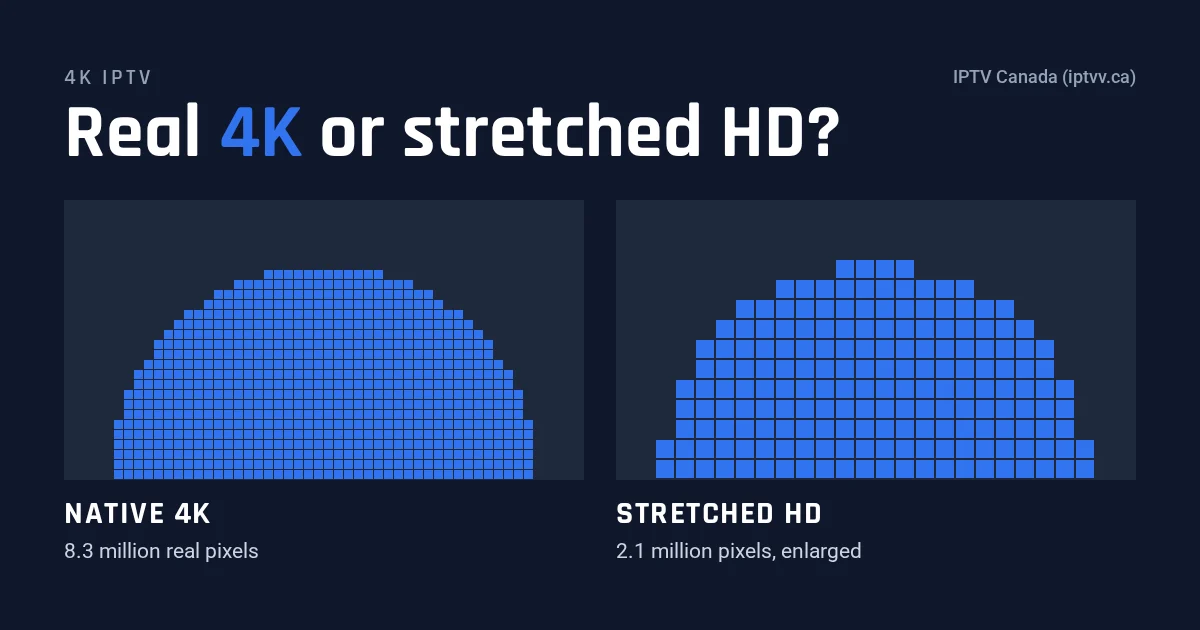
4K IPTV is real, but only for content produced in 4K, and in any large lineup that is the exception, not the rule. To actually see it, you need four things: a 4K TV, a device that decodes HEVC (H.265), a steady 25 Mbps or more for each 4K stream, and a feed that is native 4K rather than stretched HD. We know of no live 8K channel for Canadian viewers today.
We run IPTV Canada (iptvv.ca), and “is this channel really 4K?” is a question our support team hears often. So this guide is the honest version. You will learn what 4K means in pixels, which kinds of content tend to be 4K, how to check a stream yourself in two minutes, what each 4K screen needs, and why “8K IPTV” is a sales label.
What Does 4K IPTV Actually Mean?
4K IPTV means live channels or movies streamed over the internet at 3840 × 2160 pixels, which is exactly four times the pixels of a 1080p HD picture. The label only tells you the size of the frame, though, not whether the detail inside is real.
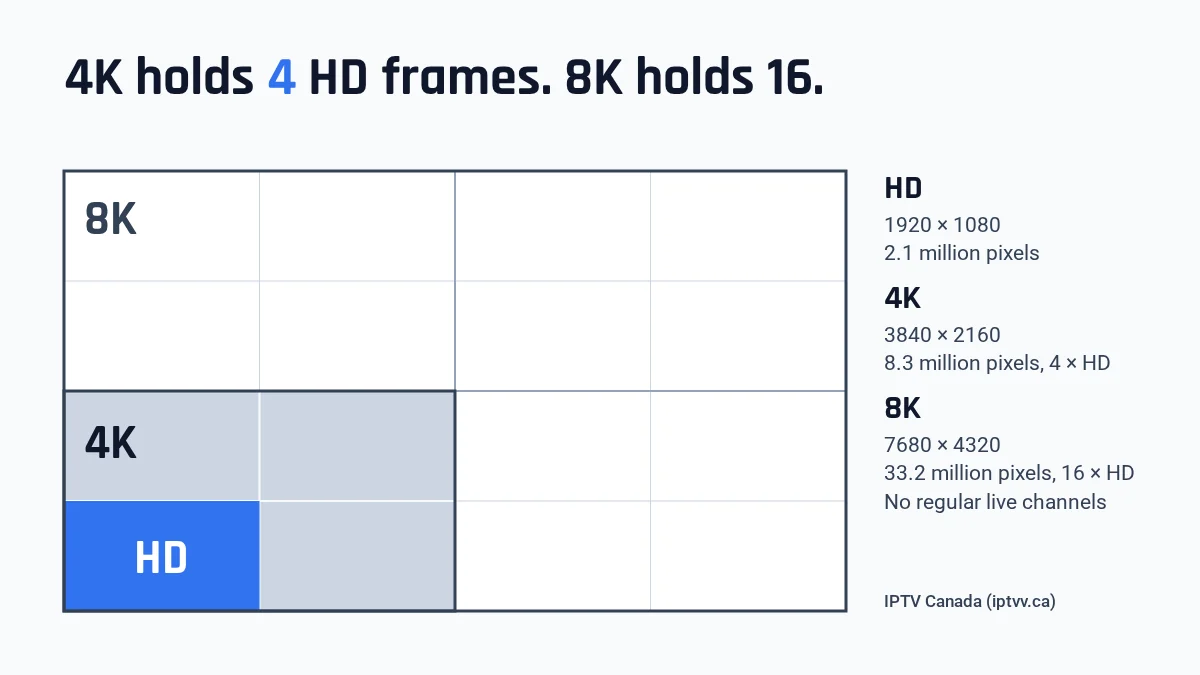
First, here is the pixel math. An HD frame is 1920 × 1080, or 2,073,600 pixels. A 4K frame is 3840 × 2160, or 8,294,400 pixels. So one 4K frame holds four full HD frames, side by side and stacked.
Native 4K vs upscaled 4K
Native 4K comes from a 4K camera or a 4K film master, then travels all the way to your TV at that size. Upscaled 4K, however, starts as an HD picture that someone stretches to 3840 × 2160. The frame size is the same, but the extra pixels are guesses, so fine detail looks no sharper than HD.
That is why two 4K IPTV channels can carry the same label and look completely different. Also, your TV already upscales every HD channel to fill its screen. A stretched feed therefore adds nothing your TV could not do on its own.
Which Content Is Really in 4K?
Real 4K IPTV content mostly shows up in three places: big live sports events with a dedicated 4K feed, recent premium films and series, and nature or showcase content made for 4K screens. Most news, talk and everyday channels are still produced in HD, so they stay HD on every service, including ours.
| Type of content | How often it is real 4K | Why |
|---|---|---|
| Big live sports events (finals, marquee games) | Sometimes | Only when the broadcaster produces a separate 4K feed; many games are HD only |
| Recent premium films and series (on demand) | Often | Many big recent productions have a 4K master |
| Nature, travel and showcase content | Often | Made specifically to show off 4K screens |
| News, talk and most regular channels | Rarely | Most studios and broadcast trucks still work in HD |
| Older films and TV series | Rarely | Only when someone restores them in 4K |
In short, a lineup of 25,000+ live channels and 120,000+ movies and series can only be 4K where a 4K source exists. That is exactly how we describe ours: 4K where available. Also, our guides to the channels you get with IPTV and IPTV for movies cover the catalogue itself.
How Can You Tell if a 4K IPTV Stream Is Real?
Open the player’s stream information to confirm 3840 × 2160 and the HEVC codec, then compare fine detail against the HD version of the same content. The resolution number proves the frame size, but only your eyes can tell native detail from stretched HD.
- Play it for 30 seconds. Pick the channel or title marked 4K and let the picture settle, because many players start at a lower quality.
- Open the stream info. Most players show it in the options or info menu, so check there first. You want to see 3840 × 2160 (or 2160p) and HEVC, also written H.265.
- Read the result. If it says 1920 × 1080, either the feed is HD or your device has stepped down. Check the device’s display output setting before you blame the feed.
- Look at fine detail. Grass, crowd faces, hair and small on-screen text look crisp in native 4K. In stretched HD, however, they look as soft as on a regular HD channel.
- Switch back and forth. Jump between the 4K and HD versions of the same event or title, then compare. If you cannot see a difference from your couch, that feed gives you nothing extra.
- Check the bitrate if shown. A 4K feed with roughly the same bitrate as your HD channels is usually an HD picture in a 4K wrapper.
One caveat: on a smaller TV seen from across the room, the gap between good HD and real 4K shrinks. So run this test on the TV you actually watch.
What Do You Need to Watch 4K IPTV at Home?
You need a 4K TV, a device that decodes HEVC at 4K, an HDMI 2.0 or newer connection, the device output set to 2160p, and a steady 25 Mbps or more per 4K stream. If any one link in that chain is HD only, you see HD.
- A 4K TV. The spec sheet should say 3840 × 2160, UHD or 2160p.
- An HEVC (H.265) device. HEVC is the compression standard that makes 4K practical over home internet, because it needs far less data than the older H.264 for the same picture. A recent smart TV app, a 4K streaming stick or a 4K box can all decode it. However, an HD-only stick will play 4K feeds in HD at best, or stutter.
- The right HDMI port. With an external device, use an HDMI 2.0 or newer input that supports HDCP 2.2, and a high-speed cable. Also, some TVs only accept 4K on one or two of their ports.
- Output set to 2160p. Many devices default to 1080p, so check the display settings once after setup.
- A stable connection. Wired Ethernet is best; strong 5 GHz Wi-Fi in the same room comes second.
- HDR, if you want it. The TV, the device and the stream all need to support it (more on that below).
For device buying terms, such as memory, ports and price ranges, see our IPTV box guide. Many recent 4K smart TVs already decode HEVC, so you may not need new hardware at all. Once the device is ready, our installation guide walks you through the player setup.
How Much Internet Speed Does 4K IPTV Need?
Each 4K IPTV stream needs about 25 Mbps as a working minimum and 50 Mbps for a comfortable margin. Every screen playing at the same time adds its own stream, so two 4K screens need roughly double. Our internet speed guide for IPTV has the full SD, HD and 4K table.
Here is how the numbers grow when several TVs play 4K at once:
| 4K screens playing at once | Working minimum | Comfortable |
|---|---|---|
| 1 | 25 Mbps | 50 Mbps |
| 2 | 50 Mbps | 100 Mbps |
| 3 | 75 Mbps | 150 Mbps |
| 4 | 100 Mbps | 200 Mbps |
For reference, the federal government’s Connectivity Strategy sets a target of at least 50 Mbps download and 10 Mbps upload for every Canadian. A plan at that level covers one 4K screen comfortably, while two would run at the bare minimum. If you live in a rural area, the National Broadband Map shows which speeds are available near you.
Data use also matters. A 4K stream itself usually carries 15 to 25 Mbps, so the comfortable figures leave room for dips. Every 1 Mbps sustained for an hour uses 0.45 GB. For example, a 4K stream running at 20 Mbps uses about 9 GB per hour, so a three-hour game uses about 27 GB. On a capped internet plan, that adds up fast.
Our plans cover 1 to 4 screens, and every screen is a separate stream. For example, 4 screens for 12 months cost $199 before tax, about $4.15 per screen per month. See the pricing page for every option, and the multiple devices sizing guide to pick the right number.
Is HDR the Same Thing as 4K?
No. 4K is the number of pixels, while HDR (high dynamic range) is the range of brightness and colour each pixel can show. A stream can be 4K without HDR, and the two only combine when the TV, the device and the feed all support the same HDR format.
The common open formats on streams are HDR10 and HLG. HLG was designed for live broadcasts, so it is the one you are most likely to meet on live sports feeds. If any link lacks HDR, the picture simply plays in standard range. That is normal behaviour, not a fault.
Is 8K IPTV Real?
Not for live TV. We know of no regular 8K channel available to Canadian viewers, and almost no film or series reaches home streaming in 8K. An offer sold as “8K IPTV” delivers 4K or HD content under a bigger number.
- The math: 8K is 7680 × 4320, or 33,177,600 pixels. That is 4 times 4K and 16 times HD.
- The production gap: cameras, studios, trucks and broadcast links would all need replacing. Most live TV has not finished moving to 4K yet.
- The bandwidth: even with efficient compression, an 8K stream would need several times the bandwidth of 4K, for every screen.
- The hardware: few homes own an 8K TV, and few streaming devices decode 8K at all.
- The name trick: several sellers put “8K” in their brand name. But a brand name is not a resolution.
If you already own an 8K TV, it upscales 4K and HD by itself. So you do not need an “8K” subscription for that.
How Do You Test 4K IPTV at Peak Hour Before Paying?
Use a free trial and run your 4K IPTV test in the evening, roughly 8 to 10 p.m., when most homes in your area stream at once. Our trial lasts 24 hours and needs only an email, no credit card, so you can test both the evening peak and the next morning on your own TV.
- Start in the afternoon. Request the free 24-hour trial early, so the window covers the evening.
- Install on the TV you will use. Testing on a phone tells you little, because the screen and the connection differ.
- Run a speed test on that same TV or device. Note the number, then repeat it at 8 p.m.
- Play 4K for 20 minutes at peak. Choose fast motion, such as a live game or an action film, and check the stream info.
- Load the house. Ask the family to stream as usual, because that is your real evening.
- Fix, then retest. If it stutters, try a wired connection or move closer to the router. Our buffering fixes list the usual causes.
- Repeat the next morning. If the speed test also drops in the evening, your connection is the bottleneck. If the speed test holds but the stream stutters, tell our support team.
Our IPTV free trial guide adds a checklist for channels, the TV guide and movies. Then, if 4K looks right on your screen, choose your screens and length on the pricing page.
4K IPTV: FAQ
How much data does 4K IPTV use per hour?
Every 1 Mbps sustained for an hour uses 0.45 GB. So a 4K stream running at 15 Mbps uses about 6.75 GB per hour, and one at 25 Mbps uses about 11.25 GB. On a capped plan, switch to HD for long viewing sessions.
Does 4K cost extra on your plans?
No. IPTV Canada (iptvv.ca) has no separate 4K tier: every plan includes the same catalogue, with 4K where available. The price depends only on the number of screens and the plan length. Today, one screen for one month is $19 before tax.
Can you watch 4K on a phone or laptop?
Some phones and laptops can decode 4K, but most screens on them are smaller than 4K, so you see little or no difference. Save 4K for a large TV, and let phones play HD, which also uses far less data.
Why does my 4K stream buffer when HD plays fine?
A 4K stream needs several times the bandwidth of HD, so a connection that handles HD easily can fall short at peak hour. Try a wired connection, check your speed on the TV itself, or switch that screen to HD.
Is Wi-Fi good enough for 4K streaming?
Strong 5 GHz Wi-Fi in the same room usually works for one 4K screen. Through walls or floors, speeds drop and fluctuate, so a wired Ethernet connection is the reliable choice for 4K, especially during live sports.
Does a “4K” label on a channel guarantee real 4K?
No. A label only promises a 3840 × 2160 frame, and an upscaled HD feed fills that frame too. Check the stream info, then compare fine detail against the HD version of the same content to see whether the extra pixels are real.