


Premium IPTV: 7 Things That Actually Make a Service Premium
Premium IPTV is a service that passes seven checks you can run yourself: streams that stay steady at 8 p.m., channels that start in seconds, a TV guide that matches the screen, real 4K where it exists, support that answers, honest catalogue numbers and clear terms. A big channel count or the word “premium” on a homepage proves none of them. You can check all seven in one 24-hour free trial, before you pay anything.
We run IPTV Canada (iptvv.ca), so we see every day which of these things customers notice first and which marketing claims they ask us about. Each of the 7 checks below comes with a simple test and a pass mark you can use on any seller, including us. The post also lists the red flags that make “premium” an empty label, and our prices before tax.
What Does Premium IPTV Actually Mean?
Premium IPTV has no official definition. No regulator or standards body certifies it, so any seller can print the word. In practice, the word should mean a paid service that performs well where cheap services fail: at peak hour, on your main TV, with support behind it.
The label alone proves nothing. Seller pages that rank for this term, ours included, list the same features: thousands of channels, 4K, low buffering and 24/7 support. None of those claims is a test, so we define premium by what you can check yourself.
| The claim on the page | How you check it yourself |
|---|---|
| “Thousands of channels” | Your own must-watch channels are there, and they play |
| “Zero buffering” | 30 minutes at 8 p.m. with no freeze that needs a restart |
| “4K quality” | The stream info reports 3840 x 2160 on 4K content |
| “24/7 support” | A real answer to a real question during your trial |
| “Best price” | A clear price before tax, tax shown before you pay, no automatic renewal |
Does Premium IPTV Mean Premium Channels?
Not usually. On cable, “premium channels” are paid add-on tiers, such as movie or sports packages that cost extra each month. With IPTV, the word mostly describes the service itself, not an extra tier of channels.
We have no premium tier to add later. Every plan includes the same catalogue: 25,000+ live channels and 120,000+ movies and series, with 4K where available. Only the number of screens and the plan length change the price. When a seller offers a “premium” plan above a “standard” one, ask exactly what the extra money adds. If the answer is vague, the difference is probably just the name.
Before you compare offers, write down the 10 channels or events you would miss most. Then use our guide to the channels you get with IPTV in Canada to see how lineups are organized.
Which 7 Things Make an IPTV Service Premium?
Seven things separate a premium IPTV service from one that only has the label: peak-hour stability, fast channel start, an accurate TV guide, real 4K, responsive support, honest catalogue numbers and clear terms. Each one takes minutes to test, so a 24-hour trial covers all seven.
| Check | How to test it | What good looks like |
|---|---|---|
| 1. Peak-hour stability | Watch one live channel for 30 minutes between 8 and 10 p.m. | No freeze that needs a restart |
| 2. Channel start time | Open 20 channels from different categories | Nearly all start within a few seconds |
| 3. TV guide accuracy | Compare the guide with what is on screen on 5 channels | Listings match, in your time zone |
| 4. Real 4K | Play 4K content and open the stream info | 3840 x 2160, on content labelled 4K only |
| 5. Support | Send one real setup question | A clear answer to the question you asked |
| 6. Honest catalogue | Search for your 10 must-watch channels or titles | They are there and they play |
| 7. Clear terms | Read the price, tax and renewal before paying | Price before tax, tax shown, no surprise charge |
No single check proves quality on its own. A service that passes all seven, including at peak hour, has earned the label.
How Do You Run Each Premium IPTV Test in a 24-Hour Trial?
Each test takes 5 to 30 minutes of your time, so all seven fit easily inside the 24 hours. You only need your main TV, a phone for a speed test and a list of your 10 must-watch channels. Each check below has the exact steps and the result that counts as a pass.
1. Is the stream stable at peak hour?
Between 8 and 10 p.m., many homes in your area stream at the same time, and that is when weak services fall apart. Pick one live channel, ideally sports or news, and watch it for 30 minutes on your main TV.
A short pause that recovers by itself can come from your own Wi-Fi. A freeze that needs a restart, on several channels, comes from the service. If you see problems, run a speed test at the same time. HD needs about 15 Mbps per stream for comfort, so frozen streams on a fast line point to the seller. Our guide to internet speed for IPTV covers this test in detail.
2. How fast do channels start?
Open 20 channels across news, sports, movies, kids and international categories, and count how many start within a few seconds and how many never load. A premium service plays nearly all of them. If several channels on your must-watch list stay black, the big count on the homepage does not help you.
3. Does the TV guide match the screen?
The TV guide (EPG) is what makes IPTV feel like cable. Pick 5 channels you know and compare the show listed with the show playing, and check that times appear in your own time zone. A guide that is empty, an hour off or showing yesterday’s schedule is a sign of a neglected service.
4. Is the 4K real?
Real 4K exists only where a 4K source exists, so a premium service labels some content 4K, not all of it. Play something marked 4K and open the stream information in your player: it should report 3840 x 2160. Each 4K stream needs about 25 Mbps as a minimum and 50 Mbps for comfort. For the full method, read our guide to real 4K IPTV.
5. Does support answer the question you asked?
Send one real question during the trial, such as how to add a second TV. Note how long the reply takes and whether it answers your question or pastes a generic script. Ask in the language you want support in. A seller who does not answer a trial user rarely does better after you pay.
6. Is the catalogue described honestly?
Search for your 10 must-watch channels and a few recent movies. Large counts, ours included, cover channels from many countries and languages, so you will only watch a small share of them. Check that your share is there and plays. A seller who shows you the lineup before you pay makes this check easy.
7. Are the price and renewal terms clear?
Before you pay, you should know the price, the tax and what happens when the plan ends. In Canada, the Competition Bureau’s drip pricing guidance says the only extra fixed charges allowed on top of an advertised price are those imposed by government, such as sales tax. With us, prices are before tax, checkout adds your provincial tax, and renewal is manual, so nothing is charged automatically.
What Are the Red Flags Behind a Premium IPTV Label?
The biggest red flags are promises that cannot be tested or kept: lifetime access, everything in 4K or live 8K, countdown timers, and guarantees offered instead of a free trial. Any one of them means the word “premium” is doing the selling.
- Lifetime offers. IPTV costs money to run every month, so a one-time payment for life does not add up. Our 12-month plan guide explains why lifetime deals are a warning sign.
- “Everything in 4K” or live 8K. Real 4K needs a 4K source, and many live channels do not have one. A promise of 4K or 8K on every channel cannot match what the streams deliver.
- Countdown timers. A timer that says the price goes back up when it hits zero exists to stop you from testing first.
- A guarantee instead of a trial. A money-back promise is only as good as the seller’s willingness to pay it. A free trial that needs no card asks you to trust nothing.
- Fees that are not tax. “Service” or “activation” fees that appear only at checkout are exactly the practice the drip pricing rule targets.
- No real contact. If the only way to reach the seller is a form that never answers, you will meet the same silence when something breaks.
If an offer feels wrong, the Canadian Anti-Fraud Centre’s list of frauds links to plain explanations of how common online scams work. For the legal side, our guide to whether IPTV is legal in Canada covers the legal side in plain terms.
Does Premium IPTV Cost More?
Not necessarily. Price does not prove quality: a $40 service can freeze at 8 p.m. while a $19 one holds. Our one-screen plans cost $19 for 1 month, $29 for 3 months, $49 for 6 months and $79 for 12 months, in CAD and before tax.
| 1-screen plan | Before tax | Per month | Total in Quebec (14.975% tax) |
|---|---|---|---|
| 1 month | $19 | $19.00 | $21.85 |
| 3 months | $29 | $9.67 | $33.34 |
| 6 months | $49 | $8.17 | $56.34 |
| 12 months | $79 | $6.58 | $90.83 |
In Quebec, buyers pay 5% GST plus 9.975% QST, while buyers elsewhere see their own provincial rate at checkout. More screens lower the cost per screen: 4 screens for 12 months cost $199 before tax, which is $4.15 per screen per month.
The annual plan is not always the best buy. On one screen it becomes the cheapest option only from 10 months of use, because 6 + 3 months costs $78 for 9 months. For every plan and screen count, see our pricing page, or read what IPTV costs in Canada across the market.
How Do You Plan a Trial So You Test Everything?
Start around 6 p.m. on a weekday, finish the peak test before 10 p.m., and use the next day for support and terms. Our trial lasts 24 hours and needs only an email, with no credit card, so the whole plan fits inside it.
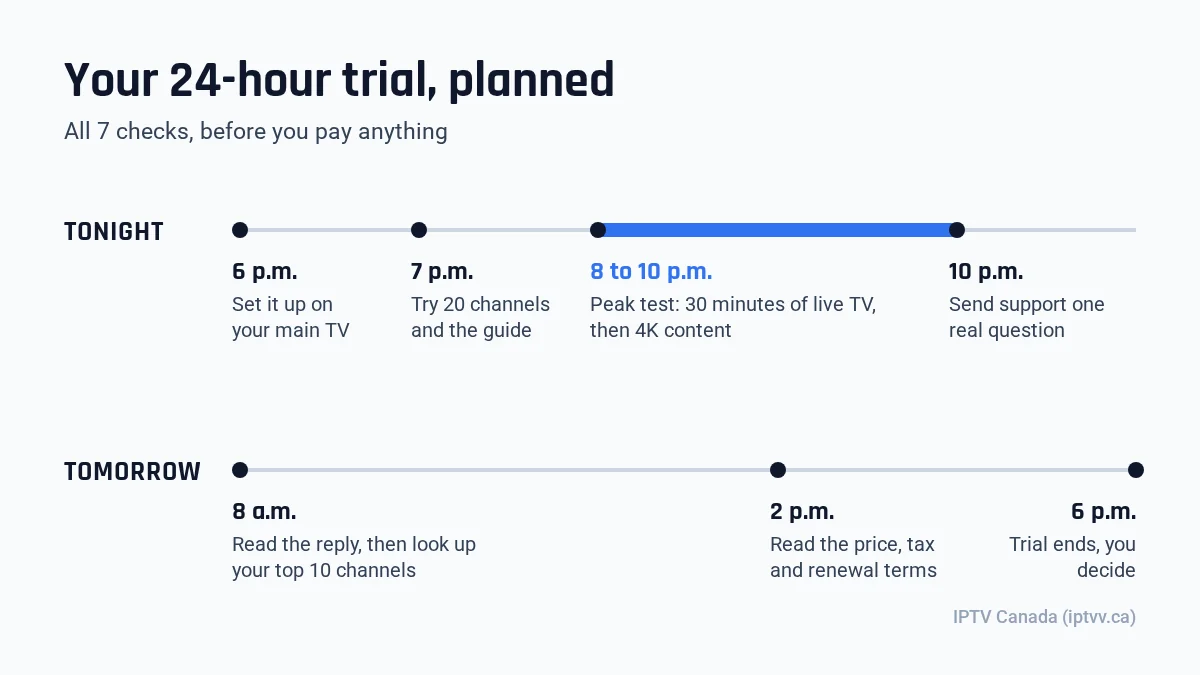
- 6 p.m.: start the trial and set it up on your main TV. Our installation guide covers each device.
- 7 p.m.: open 20 channels and check the TV guide on 5 of them.
- 8 to 10 p.m.: watch one live channel for 30 minutes, then 4K content if you have a 4K TV.
- 10 p.m.: send support one real question.
- Next morning: read the reply, then search for your 10 must-watch channels and titles.
- Before 6 p.m.: read the price, tax and renewal terms, then decide.
If the service passes, pick the plan length that matches how long you will really watch. If it fails, you have lost an evening and nothing else. You can start your free trial below and score us on the same 7 checks. For a wider comparison method, see our guide to the best IPTV providers in Canada.
Premium IPTV: FAQ
Is premium IPTV legal in Canada?
The word premium says nothing about legality. IPTV is a delivery method, and what matters is how a service is run and what it carries. We do not give legal advice. Our guide to whether IPTV is legal in Canada explains the issues in plain terms.
Is a bigger channel count a sign of premium IPTV?
No. Large counts cover channels from many countries and languages, so most viewers watch a small share of them. A premium IPTV service is one where your own must-watch channels are present, start in a few seconds and stay stable at 8 p.m.
Do I need a special TV for premium IPTV?
No. A smart TV, a streaming stick, a phone, a tablet or a computer works with a player app and your login. For 4K you need a 4K TV and about 25 Mbps per 4K stream, with 50 Mbps more comfortable. HD needs only about 15 Mbps per stream.
Is premium IPTV worth it over cheap IPTV?
It is worth it if the cheap option fails the peak-hour test, because a stream that freezes during the evening is no bargain. Run both through the same 7 checks during a trial, then compare the price per month of the plan length you will really use.
Can I use premium IPTV on several TVs at once?
Yes, if your plan includes enough screens. Our plans cover 1 to 4 screens, so up to 4 TVs can watch at the same time. With 2 screens, the price is $29 for 1 month or $129 for 12 months, before tax, and each screen can watch a different channel.
Should I buy the longest plan right away?
Not before testing. Run the free trial first, then start with a plan length you are sure to use. On one screen, the 12-month plan at $79 before tax is the cheapest choice only if you watch for 10 months or more.
Is the player app included with a premium IPTV subscription?
No, and that is normal. A premium IPTV subscription gives you the channels and a login, while the player is a separate app you install on your device. The same trial login works in any player that supports its login format, so you can try two before you choose. Our guide to choosing an IPTV app explains what a good player should do.